Description
NWBView is a cross-platform software with a graphical user interface to display the contents of the binary NWB file format. It is written in Rust for high-performance, memory safety and ease of deployment.
Features include:
- Display contents of NWB files in a tree structure
- Interactive plots for voltage and current recordings data
- Scalable window display for tabular and text data
- Built with egui Rust GUI library for rendering
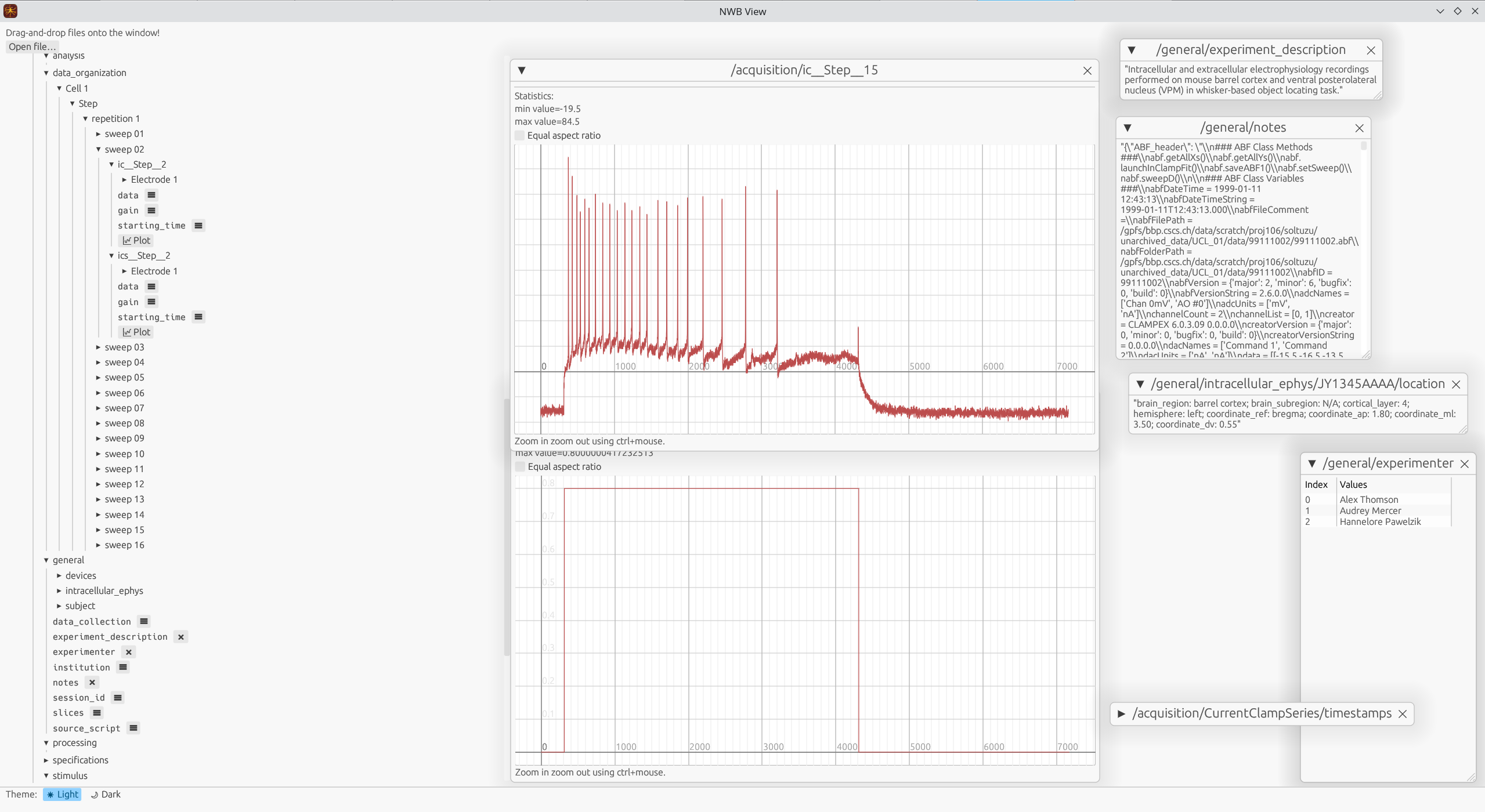
The screenshot above shows the NWBView GUI. The left panel shows the contents of the NWB file in a tree structure. The right panel shows the details of the selected item, which can be a plot, a table or a text.
Installation
Using Cargo
Cargo is the package manager for Rust, and NWBView is listed as a package there. You can find it on crates.io.
Note: HDF5 needs to be installed in your system as cargo will try to locate the HDF5 root directory and/or headers.
- Install the
cargopackage manager - Run:
cargo install nwbview
- Launch NWBView:
nwbview
Building from Source
The Rust library dependencies are provided in the cargo.toml file.
System dependencies (package names may differ between systems):
libgtk-3-devlibrust-atk-devlibhdf5-serial-dev
Once all dependencies are satisfied:
cargo run --release
The release flag builds the artifacts with optimizations. Do not specify it when you need to debug.